

I’ve been using Asana for over 10 years and teaching business owners how to run and manage their businesses with Asana for 8+ years.
Asana is incredibly effective at organizing tasks and projects.
It’s worked so well that I’ve taught thousands of people how to use it to keep their businesses organized and on track.
I’ve taught Asana as a second brain. A place that holds your ideas, context, links and priorities and helps you manage your work so you can get more of the right things done.
But the way we work has changed.
As more and more of my work started happening inside AI tools like Claude and ChatGPT, I ran into two problems:
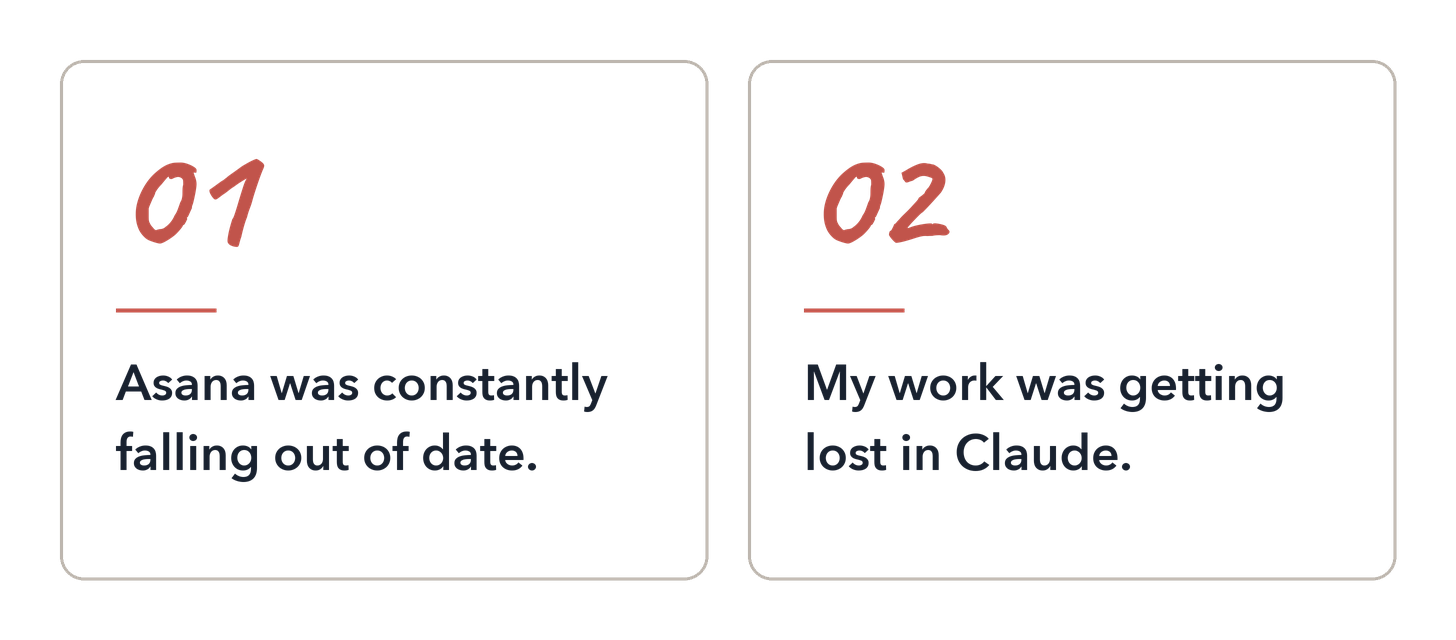
Asana was constantly falling out of date, and keeping it current became make-work.
My thinking, decisions and actual work product were getting mixed together in a mess of chat threads in Claude and never making it to Asana.
I went from working in Asana most of the day, organizing and doing my work there, to doing most of my work in Claude and then checking in with Asana to update tasks and projects.
Keeping everything current as priorities shift became a job in itself.
I’d build the projects. Add the tasks. Update the statuses. Move the dates. And reorganize things when priorities change.
Asana used to save me so much time and all of a sudden I was spending time maintaining it instead of just getting work done.
As a one-person business, this is just silly.
At the same time, the work I was doing was starting to become messy in Claude.
I was losing track of where I was working on particular things and losing where I was in the process of some projects. Asana was no longer my one source of truth.
So I made Claude my project manager
The obvious solution was to stop trying to maintain two separate systems.
If most of my thinking and work was already happening with Claude, why was I taking everything that happened there and manually recreating it somewhere else?
I started pretty simply with Claude Projects.
I created projects for the different areas of my business and gave Claude the context it needed for each one. Instead of starting from scratch in every chat, Claude knew what we were working on, could reference previous conversations and files, and had instructions for how I wanted it to work with me.
That alone was very useful.
My work was at least organized instead of disappearing into a giant list of unrelated chats. And I could update the instructions and memory to help me stay organized.
But, it still wasn’t quite working.
Then I moved into Claude Code and took the same idea much further.
I set up my business locally and started giving projects their own folders and files. Strategy, research, decisions, plans, drafts and other working context could live in the folders instead of being lost in whichever conversation we happened to have about it.
Then I added a CLAUDE.md file that told Claude how to work with the system and the MEMORY.md file gave it persistent context about what was happening. And Claude keeps that up to date.
This was where it started to feel less like organized file storage and more like having a project manager.
I didn’t have to decide where every piece of information belonged or manually keep every project file organized. Claude could organize the files for me, maintain the project structure, keep track of what we’d decided and update the relevant context as we worked.
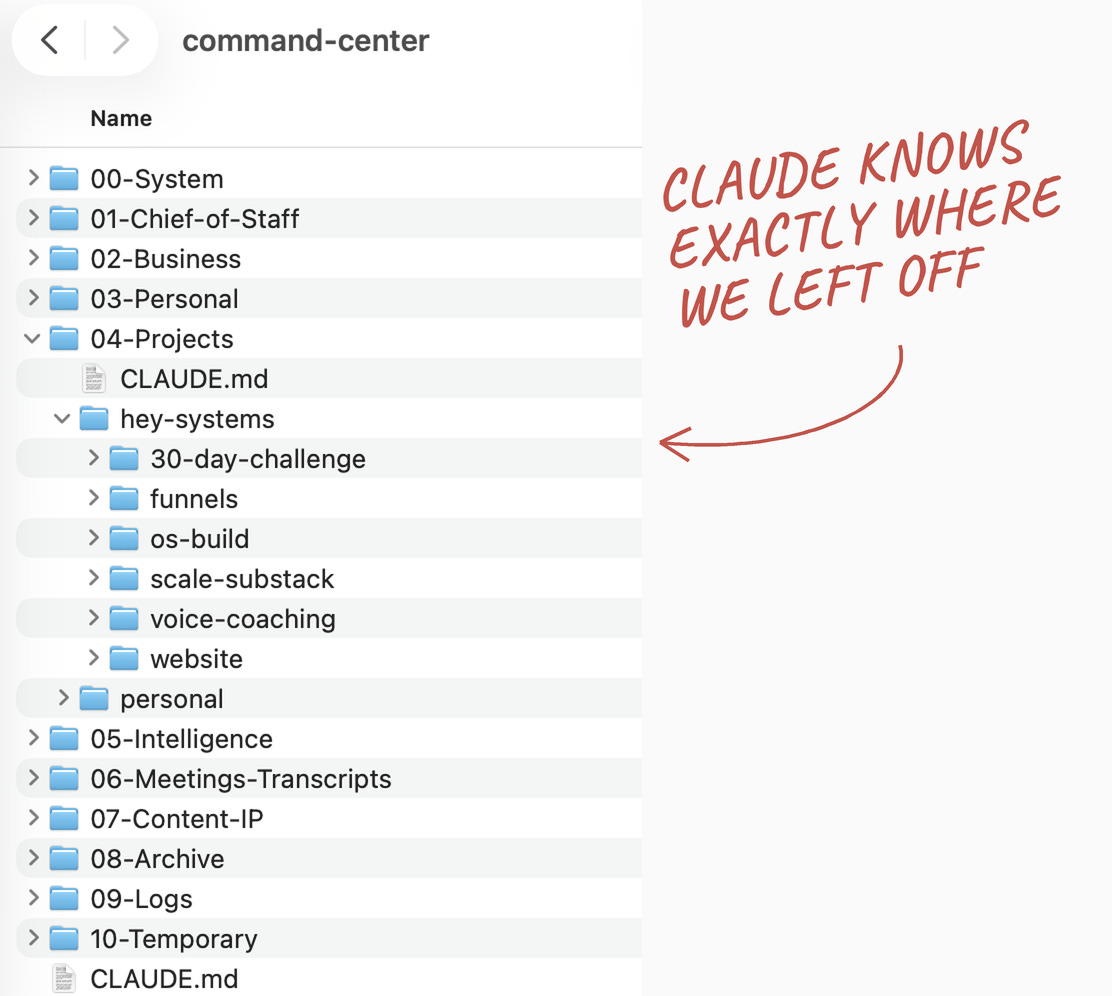
When I first got this working, I knew that work would never be the same again.
Claude could come into a project, read the files, understand where we’d left off and continue working from the current state.
If we made a decision, that decision could become part of the project context.
If priorities changed, the files were updated.
If we produced something, it could be saved with the project instead of left sitting in a chat thread.
Then I started using the system to manage the work itself.
Claude could keep track of the goals I was working toward, the projects to reach the goals, what had been decided, what was in progress, what I needed to do, what Claude could handle, and what was waiting on me.
That meant when something changed while we were working, I didn’t have to finish the conversation, open another tool and translate the change into a project-management system.
The project manager was ever-present, already in the chat.
For a while, this made a lot more sense than trying to keep Asana updated.
It also got me much closer to what I wanted from AI in the first place: not another tool I had to manage, but something that could help me manage the business.
Then I ran into a visibility issue
There was one problem. I couldn’t see anything.
Claude could.
It could navigate the folders, read the files, find the relevant context and tell me what was happening with a project. I could ask what I should be working on today, what was overdue, where a project stood or what needed my attention, and Claude could tell me.

But I couldn’t just look at my business. I couldn’t see my projects and tasks in the way I was used to.
For more than 10 years, I’d been able to open Asana and see my work. I could scan my projects, look at what was due this week, see what was coming up, notice something I’d forgotten about, move a task, change a date or reorganize my priorities.
With my local system, all of that information still existed, but Claude had become the interface to it.
If I wanted to know something, I had to ask or go find it in a file somewhere.
I tried solving this with Claude too. I had it build dashboards and different ways of displaying my projects and priorities. And because Claude can build almost anything, I could keep changing them endlessly.
But that was part of the problem.
I don’t want to design a new interface every time I want to look at my work. I don’t want Claude deciding how to display my projects today based on how I happened to ask the question.
I don’t want to build a bunch of siloed dashboards (artifacts) from scratch.
I want projects to look like projects. Tasks to look like tasks. Due dates to be where I expect due dates to be. I want to be able to scan everything without having to prompt first.
And I already had a tool that did all of that incredibly well.
Asana.
I already had the interface I needed
Once I realized visibility was the issue, Asana took on a new role.
The difference was that this time, I didn’t need to use Asana as the place where I managed all of the information myself.
I could connect Claude directly to Asana and let it manage that information for me.
So I gave Claude access to my Asana workspace and had it set up my workspace to reflect my projects and priorities.
Claude already had the project context from my local system. It knew what I was working on, what we’d decided, what was in progress and what needed to happen next.
Now it could take that information and create the project structure in Asana too.
I’m working with Claude in the same way. Claude can read my local files and the context I’ve built around my business, but now it can also read and make changes in Asana.
And it works both ways.
I can open Asana myself and change a date, complete something or add a task. The next time Claude looks at that project, it can see those changes. I don’t have to go back into Claude and explain everything I did in Asana.
This solved something I hadn’t been able to solve with the local project-management system.
Claude still had access to all of the context that made it useful as a project manager, but I got a proper interface for me to work with and see the projects and priorities visually.
I can open Asana in the morning and see my projects, tasks and deadlines.
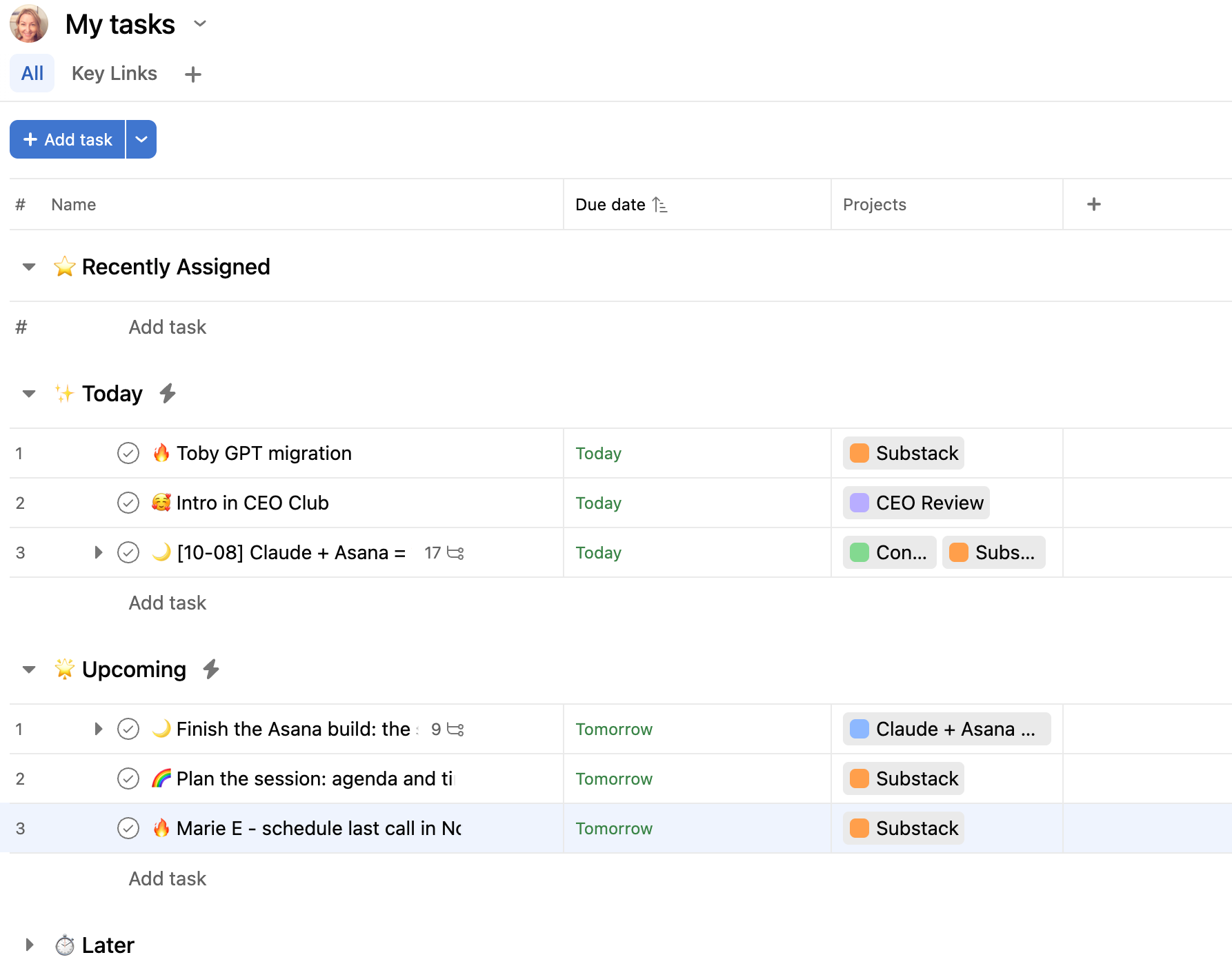
If I wanted to move something myself, I could. If I wanted to work with Claude instead, it could make the change for me.
And because we’re both working with the same projects in Asana, I don’t have to keep a project-management system updated for Claude.
Claude keeps it updated for me.
What Claude does as my project manager
At this point, Claude is involved in managing my work throughout the day, week, month and quarter.
Every morning, it runs through my calendar, Asana, email and text messages to see what’s happening and what needs my attention. It cleans up my desktop and Downloads folder, reviews what I have going on and creates a morning brief.
If I open Claude first, I can read the brief there. There’s also a Morning Brief task in my Asana task list, so I can start my day there and see it along with everything I need to do.
The morning brief changes depending on the day of the week.
On Mondays, it helps me set up the week. On Fridays, it helps me wrap things up and catch anything that needs to be dealt with before the weekend.
I also have monthly and quarterly routines scheduled that make sure I check in on the metrics and goals I care about at the right intervals.
Then there’s the ongoing project management.
Claude can:
Turn goals into projects and plans. We can start with an outcome and work backward into the projects, milestones and work required to get there.
Build and maintain my projects in Asana. It can create the project structure, organize tasks, add dates and dependencies and update the project as things change.
Capture work while we’re working. If something comes up in a conversation that needs to happen, Claude can put it where it belongs instead of relying on me to remember it later.
Keep track of decisions and changes. When I change a deadline, priority or plan, Claude has the context around that decision and can update the work it affects.
Keep track of what I need to do and what it can do. Some work needs me, some can be done by Claude, and some needs my approval before Claude does it.
Surface what needs my attention. It can review the work across the business and bring me the decisions, tasks, deadlines and blockers I need to deal with.
Help me decide what to work on. It has the context of my goals and priorities as well as what’s currently happening, so it helps me focus on the highest-leverage things to work on.
Claude also helps me manage one-off projects.
As I’m writing this article, I’m also working on a 30-day challenge for Hey Systems that starts on October 20.
I made the decision to run the challenge during a strategy session with Claude.
Once we’d worked through what I wanted to do, Claude set up the project in Asana for me based on that conversation.
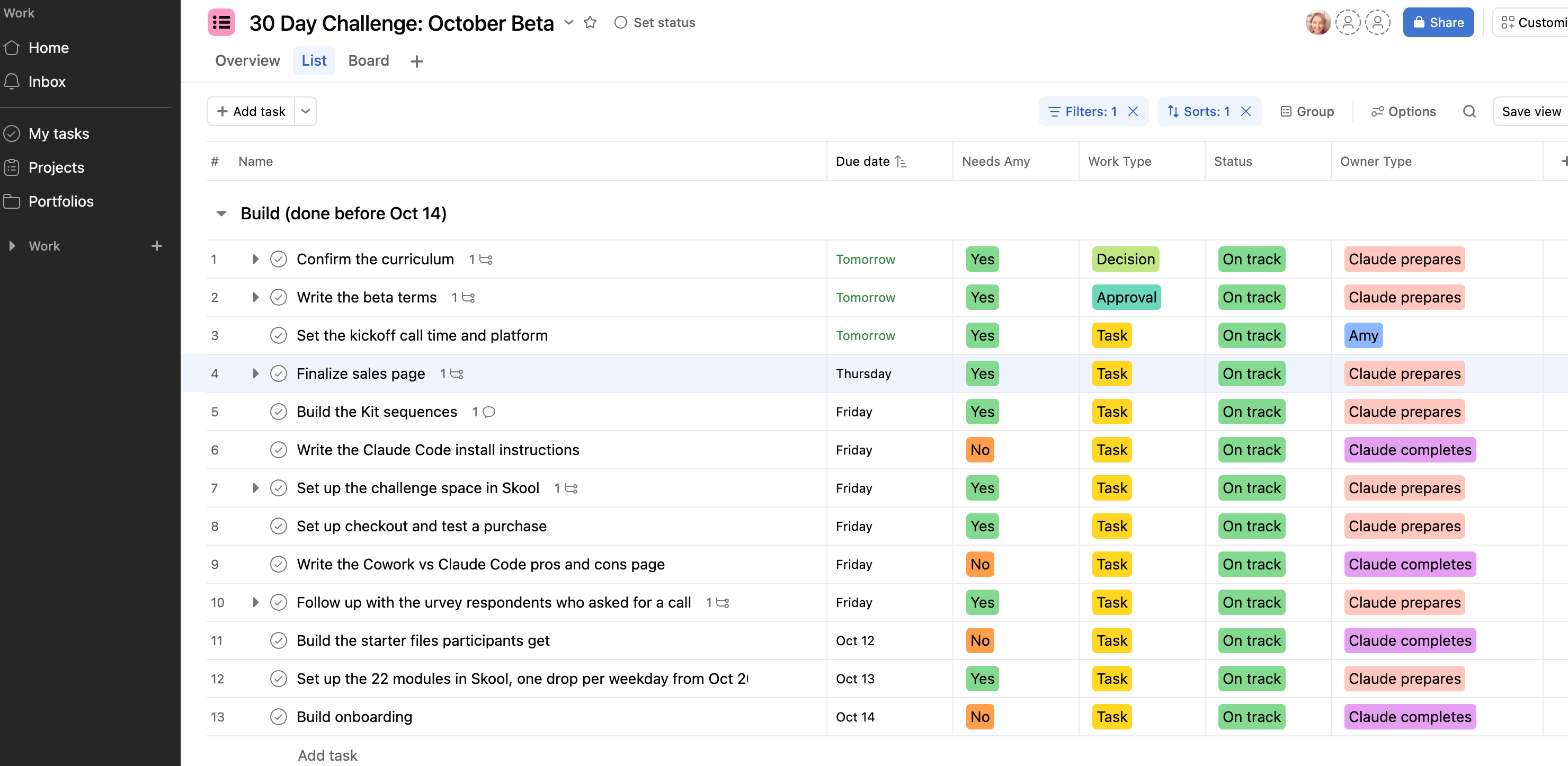
I didn’t set up any of these tasks.
It already had the context from our strategy session, so I didn’t have to sit down afterward and translate everything we’d discussed into a project plan.
Claude could organize the work, add the tasks and start working backward from the October 20 start date.
And here’s something that’s happening as I was writing this article.
I decided that I want you to be able to join the waitlist for the 30-day challenge from this article.
That means the waitlist page and email setup now need to be finished BEFORE this article can be published.
Normally, I’d have to go into Asana, update the challenge project, update this article project and figure out what needs to happen.
Instead, I told Claude what I’ve decided and let it update the project.
I also had Claude create the waitlist page and email sequence and configure the tech but that’s an article for another day. 😉
So, the 30-day Challenge waitlist page is live!
Learn how to turn Claude into your Chief of Staff in 30 days
Want to connect Claude + Asana in your business?
I’ve spent months figuring out how to give Claude enough context about my business to manage the work without creating another system I have to manage.
And there’s a lot more to it than connecting Claude to Asana.
Claude needs to understand how your business is organized, what you’re working toward, how you manage projects, what belongs in Asana, what it can change on its own, what needs your approval and what it should bring back to you.
So, let me show you how mine works.
In the rest of this article, I’ll show you:
The full setup behind my Claude + Asana system, including my local business files, Claude Code, how I’ve organized Hey Systems in Asana and how the pieces work together.
The context and project-management rules I give Claude, so it knows how I work, what becomes a task, what it can update on its own and when it needs to come back to me.
How I use the system day to day, including my Morning Brief and how Claude and Asana stay aligned when work or decisions change.
The Claude + Asana Project Manager Setup Skill I built for you, which will help you create your own project-management instructions and set this up for the way you work.
If you’re a paid Hey Systems subscriber, keep reading.
If you’re not, start a 7-day free trial and you can keep reading now, plus get access to the rest of the Hey Systems resources.
Paid subscribers also get access to my Skool community, where we do weekly check-ins and quarterly planning sessions. Our next quarterly planning session is October 15.